Insert the SIM ejector tool into the small hole on the side of your smartphone and gently press it to open the SIM card tray.
Once the tray pops out, gently pull it out with your fingers.
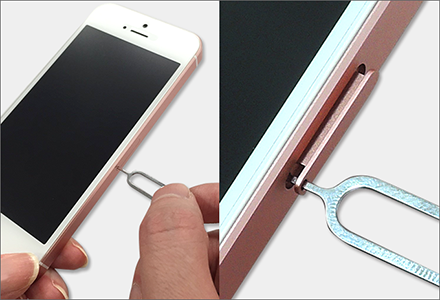
Depending on your smartphone model, you may be able to open the SIM card tray without using a SIM ejector tool.
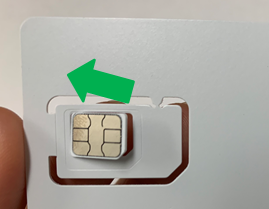
Select the SIM card size that matches your smartphone, then remove the appropriate SIM card from the included SIM card holder.
Place the SIM card in the SIM card tray and carefully insert the tray back into your smartphone.
The SIM card can be punched out into three different sizes to fit different devices.
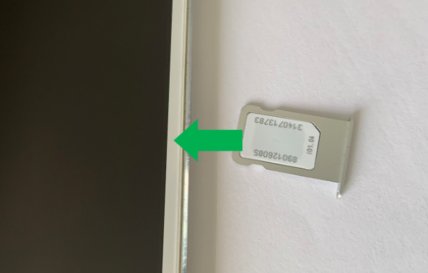
The orientation of the SIM card's metal contacts may vary depending on your smartphone model.
Restart your smartphone and check the connection using the replacement SIM card. Once the signal is stable and you can connect normally, the setup is complete.
If you need to set up voicemail, please follow the instructions below.
〈Voicemail Setup Instructions〉
Having Trouble After Replacing the SIM Card?
If you cannot receive a signal, make calls, or experience any other issues after replacing the SIM card, please contact UNIVERSAL Mobile Customer Support.
Was this article helpful?
That’s Great!
Thank you for your feedback
Sorry! We couldn't be helpful
Thank you for your feedback
Feedback sent
We appreciate your effort and will try to fix the article