Please replace your SIM card with the designated SIM card once you receive the switching completion notification, or when your current SIM card loses signal connection.
1. Remove your current SIM card from your smartphone
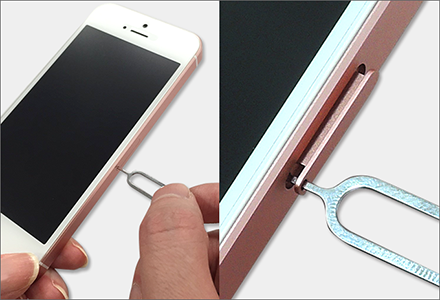
Insert the included SIM ejector pin into the small hole on the SIM card tray on the side of your device and press lightly to pop open the tray.
Once the tray pops out, gently pull it out with your fingers.
*Depending on your smartphone model, you may be able to open the tray without using a pin.
2. Replace with the new SIM card
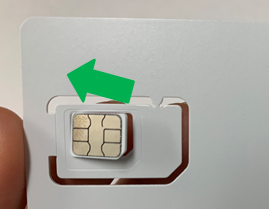
Detach the designated SIM card from the card holder according to your smartphone's SIM size,
place the SIM card onto the tray, and reinsert it back into your device.
*The SIM card can be punched out into 3 different sizes.
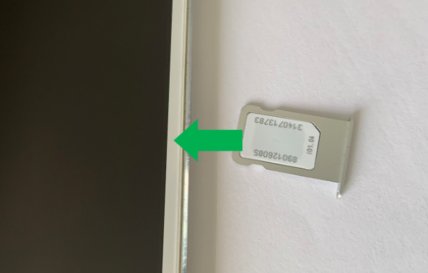
*The orientation of the gold IC contact chip may vary depending on your smartphone model.
3. Restart your smartphone and check for signal connection
Restart your smartphone, confirm that the new SIM card connects, and once the signal stabilizes, the process is complete.
The old SIM card is no longer needed, so please dispose of it at your convenience.
===========================
If you need to complete initial Voicemail setup, please follow these instructions.
〈Voicemail Initial Setup Guide〉
===========================
*In the unlikely event that you experience issues such as no signal or inability to make phone calls after inserting the designated SIM card,
do not discard your old SIM card and contact UNIVERSAL Mobile Customer Support via the "Contact Support Form".
Was this article helpful?
That’s Great!
Thank you for your feedback
Sorry! We couldn't be helpful
Thank you for your feedback
Feedback sent
We appreciate your effort and will try to fix the article