Once you receive the pocket WiFi kit, please make sure to check that the charging equipment is functioning properly before use (prior to departure).
[Click here for instructions on how to charge the pocket WiFi]
For any changes, extensions, or cancellations of your rental period, please make sure to contact customer support.
[For more information about changes, extensions, or cancellations of your rental period]
Pocket WiFi User Guide
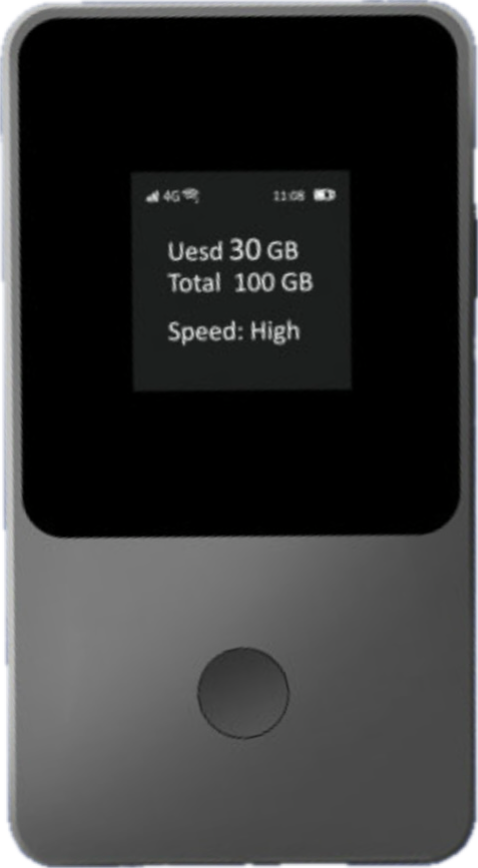
〈How to Connect〉 1. Press and hold the power button on the right side of the WiFi device lightly for about 3 seconds to turn it on. Press the power button again briefly, or press the screen display toggle button on the front of the device to light up the screen. 2. On your device (such as a smartphone or laptop), turn on WiFi and find and select the SSID displayed on the WiFi screen. 3. When the password input screen appears on your device, enter the password (PWD) displayed on the WiFi screen. *You will be able to connect to the Internet in the country of your selected from the start date. |
〈Display Information〉 The screen displays battery level, network connection status, data usage, and device information (SSID, PWD). You can switch the displayed information by pressing the screen display toggle button. The display will automatically turn off after 15 seconds. You can turn the screen on/off by briefly pressing the power button or the screen display toggle button. * "Purchase Package" function is not available, so please avoid scanning the QR code. |
〈How to Turn Off the Device〉 Press and hold the power button on the right side of the WiFi device lightly for about 3 seconds to turn it off. 〈How to Charge〉 There is a charging port (Type-C) at the bottom of the WiFi device. Use a USB cable (Type-C) to charge the device from a power outlet. After connection, according to the specifications, the device can be used for approximately 15 hours from a full charge, but usage time may vary depending on usage and connection conditions. We recommend turning WiFi on only when in use to save power. |

Troubleshooting Connection Issues
- Restart:
Please restart the Pocket WiFi and the device you want to connect.
- Check Wifi settings:
Please check if the WiFi settings on the device you want to connect have been accidentally turned off.
- Check charging equipment:
Please ensure that a properly working charging cable and charging plug are used. Charge the device for an extended period before attempting to power it on.
- Inspect the charging port:
Kindly check the charging port for any abnormalities, such as looseness or debris, which may affect charging.
- Reset the device:
Hold down the Screen content switch button for 10 seconds to perform a factory reset.
Regarding Loss or Theft
In case of loss or theft of the Pocket WiFi device or its accessories, the following charges will apply, so please handle them with care (if you are not enrolled in the Assurance Pack)
- Pocket WiFi device: $400 - Charging equipment: $20 - Case: $20 - Mobile battery: $200
Contact Information
UNIVERSAL Mobile Customer Support
Email:customer@universalmobile.us
Was this article helpful?
That’s Great!
Thank you for your feedback
Sorry! We couldn't be helpful
Thank you for your feedback
Feedback sent
We appreciate your effort and will try to fix the article